

Hey, it's Tom from OurChest here.
Your wedding photographer will capture the big moments. Your guests will capture everything else: the table next to yours losing it during the speeches, your uncle attempting something questionable on the dance floor, the view of the ceremony from six different angles, and about 40 photos you had no idea existed.
The annoying part is getting those photos back afterwards. Most wedding photos taken by guests stay on their own phones, get buried in WhatsApp groups, or turn up three weeks later after you have already stopped asking. A good wedding photo sharing app fixes that by giving everyone one obvious place to put them.
The best option is not necessarily the app with the longest feature list. It is the one your wedding guests will actually use. If people have to download an app, create an account, join the right shared album and work out permissions while standing next to the bar, you have already lost half of them.
In this guide, I will run through the wedding photo sharing options I would actually consider, what QR code photo sharing gets right, where Google Photos and Dropbox still make sense, and which features matter if you want to collect photos without turning your big day into an IT support shift.
Quick answer: what is the best wedding photo sharing app?
If the goal is simply to collect photos and videos from as many guests as possible, I would prioritize four things: a unique QR code, browser-based uploads, no guest account requirement, and original quality downloads. Everything else is secondary.
For a wedding happening today, purpose-built services such as Kululu, GuestCam and GuestPix are the obvious places to start. Kululu is strong if you want a live slideshow and a very simple guest flow. GuestCam leans heavily into unlimited guests, original-quality photos and videos, and one-time event pricing. GuestPix has a broader wedding-event feature set with QR sharing, slideshows, guestbook features and moderation.
Google Photos is still perfectly reasonable if your group already uses Google and you mainly want a shared album. Dropbox is good at moving full-resolution files but feels more like a folder than a wedding gallery. Apple Photos can work well for an Apple-heavy group, but mixed iPhone and Android guests make it less attractive.
And then there is OurChest, which is the product I am building, so I am obviously not pretending to be an impartial reviewer. The event version is being designed around one reusable QR code, no account for guests, original files, unlimited guests and a simple shared Chest that can continue to exist after the wedding. More on that later.
What you care about | Best fit |
Fast QR code photo sharing with a live slideshow | Kululu or GuestCam |
Original-quality guest photos and videos | GuestCam |
Wedding extras, guestbook and moderation | GuestPix |
Everyone already uses Google | Google Photos |
Straight file delivery and full-resolution downloads | Dropbox |
Simple accountless sharing that can outlive the event | OurChest direction |
What a wedding photo sharing app actually does
A wedding photo sharing app gives guests one shared place to upload the photos and videos they take on their own phones. Instead of chasing twenty separate message threads after the event, you create one wedding gallery or wedding photo album and point everyone at it.
The modern version of this is usually QR code photo sharing. You create the event, the service generates a QR code, and you print that code on a welcome sign, table cards, ceremony programs or anywhere else guests are likely to notice it. Guests scan the code with their phone camera, the page opens in the phone's browser, and they upload photos directly.
That is the whole idea. It should not need a tutorial.
A good flow is basically three steps: guests scan, choose their photos, upload. If the service also lets people browse the shared album, download guest shots, or view a live slideshow in real time, great. But none of those extras matter if the upload flow itself is annoying.
One QR code or link that is easy to find throughout the venue
No app download required for guests
No account required just to contribute
Fast upload from iPhone and Android
Original quality or full resolution files rather than compressed chat copies
A private wedding gallery you control
An easy way to download everything after the event

Why the QR code matters more than another fancy feature
The QR code is not interesting technology. That is exactly why it works. Every modern phone camera already knows what to do with it, so guests scan a sign and land in the right place without typing a URL or searching an app store.
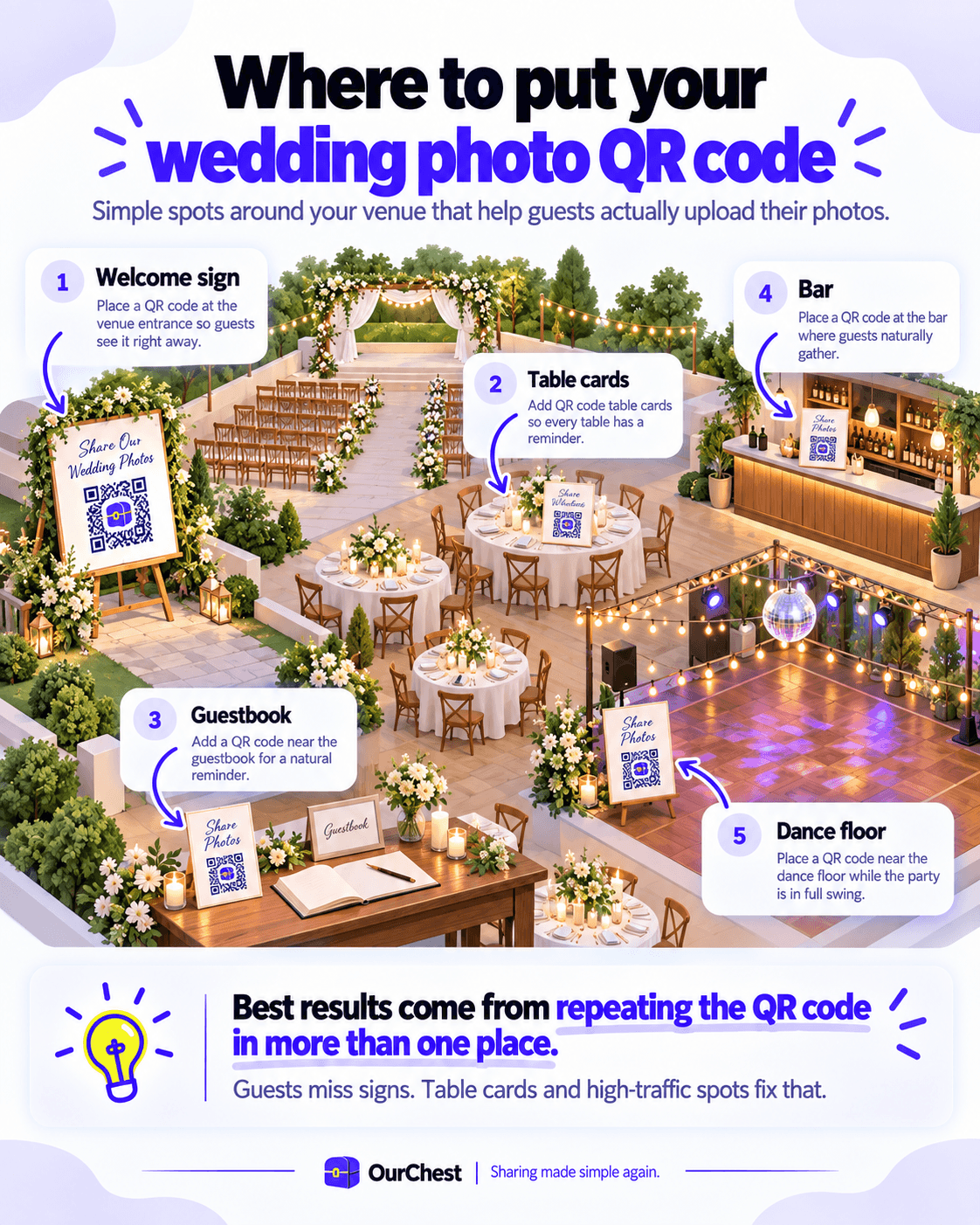
The mistake is hiding the code in one place. Put a QR code sign at the entrance, but also use table cards, the guestbook area, the bar and somewhere near the dance floor. People take photos at different points during the night, so the reminder needs to appear more than once.
Keep the instruction brutally simple. Something like 'Scan to share your photos and videos' is enough. Do not write a paragraph explaining the service underneath it. The whole point is easy sharing.
I would also test the exact QR flow before you print 150 cards. Scan it on an iPhone, scan it on Android, try it on mobile data, and ask somebody who has never seen the site before to upload a guest photo. If you have to explain what to press, fix the flow or choose another service.
Why no-login uploads usually win

This is where a lot of otherwise decent photo sharing apps make life harder than it needs to be. The couple has a reason to create an account because they are setting up and managing the event. A wedding guest does not.
If every guest has to install an app, register, verify an email and then find your wedding, participation is going to fall off. People are at a wedding to drink, dance, talk to friends and take photos. They are not there to complete onboarding.
The best wedding photo sharing flow treats the QR code like the invitation into the gallery. Guests scan it, land on a simple web page in their phone's browser, enter a name if needed, select photos from their own phones and upload. That is it.
This matters even more for family members who are less comfortable with tech. A browser page with one big Upload button is much easier than telling somebody to download a new app, remember a password and join an album. If you are comparing services, literally ask: is an app required for guests? If the answer is yes, I would want a very good reason.

The wedding photo sharing apps I would compare
There are a lot of wedding photo apps now, and most of them are built around the same basic idea. The differences are in how easy the guest experience is, how much control the host gets, whether the files stay in original quality, and how aggressively the pricing scales.
I would not choose purely from the feature grid. Create a test event on your shortlist and use it like a guest would. The best wedding photo sharing app is the one that disappears into the day rather than becoming another thing somebody has to manage.
1. Kululu: strong for QR sharing and a live photo wall
Kululu is one of the more established purpose-built options. Guests can join through a link or unique QR code without an app download or registration, upload photos and videos, and see them inside a digital album. It also has a live slideshow, which can display new uploads on a TV or projector during the reception.
That makes it a good fit if you want the wedding gallery itself to become part of the night. Guests upload a candid moment, it appears on the screen, somebody else sees it and remembers to upload their own shots. The loop encourages participation without needing you to keep reminding people.
It also supports batch downloads, so you can collect photos during the event and then pull the full set down afterwards rather than saving each wedding picture individually.
2. GuestCam: good if original quality and unlimited guests matter
GuestCam is worth looking at if your priority is straightforward collection without counting heads. Its wedding plans are built around a private gallery with a QR code and link, unlimited guests, and unlimited photo and video uploads. It also advertises original quality downloads rather than resizing or compressing the files.
That last part matters more than it sounds. Guest photos are not just disposable social posts. You may want to print them, include them in a wedding photo album, crop them later, or keep a full-resolution copy alongside the professional photographer's files.
GuestCam also offers a live slideshow and one-time event plans, so it covers the main wedding-specific features without turning the pricing into a monthly subscription.
3. GuestPix: broader event features and guestbook extras
GuestPix sits in the same general category but leans further into the event experience. Its wedding plans include a QR code, photo and video uploads, moderation, slideshows and guestbook-style features.
It is a good option if you want more than simple photo collection and actually plan to use those extras. The warning is the same as with every wedding app: do not buy a long list of features just because they exist. If your real goal is 'collect photos from guests and download them afterwards', judge the product on that flow first.
4. Google Photos: familiar, capable, but not built for the wedding
Google Photos is the obvious free option for a lot of couples. Create a shared album, send the link, and people can add photos. If your friends and family already live in Google's ecosystem, it can work perfectly well.
The problem is friction. Google Photos was designed as a general photo library, not a wedding photo sharing app. Guests can hit account prompts, contribution permissions and the usual 'which Google account am I using?' nonsense. None of that is catastrophic, but every extra step gives somebody another reason to think 'I'll do it later' and then never do it.
It also lacks the event-specific layer you get from dedicated tools. There is no obvious printed QR workflow, no wedding-focused welcome page, and no built-in reason to put a live slideshow next to the dance floor. You can create some of that yourself, but at that point you are assembling the experience rather than buying it.
5. Dropbox: excellent file storage, awkward wedding guest experience
Dropbox is good at files. If you care about original quality, large videos and full-resolution downloads, that is a strength. You can create a folder or file request, send a link and collect uploads without worrying about social-media compression.
But it still feels like Dropbox. For a photographer, coordinator or technically comfortable group, that may be absolutely fine. For 120 wedding guests ranging from your university friends to your grandparents, it is less natural than a page that simply says 'Upload your wedding photos here'.
I would use Dropbox as a storage or backup layer rather than my first choice for the guest-facing experience.
Where OurChest fits
This is the bit where I mention the thing I am building. You knew it was coming.
OurChest did not start as a wedding app. The original problem was family photos getting dumped into group chats, compressed, buried and then scattered across everybody's phones. The broader idea is a private shared place that anyone can open with a link or QR code and a name, without forcing every recipient to create an account.
That maps surprisingly well to weddings. An Event Chest can use one reusable QR code, let wedding guests open it in their browser, upload original photos and videos, and give the couple one place to keep the collection afterwards. The current product direction is also to avoid per-guest pricing. Storage costs money; the number of people standing at your wedding does not.

I am deliberately not trying to turn OurChest into a giant wedding-planning platform with seating charts, RSVPs, vendor management and fourteen different gamification features. The useful part is simpler: collect the files, make access painless, preserve the originals, and let the shared Chest continue after the event instead of disappearing into a one-off gallery.
Event Chests are part of the product roadmap rather than something I am pretending is already established. If you need a wedding photo sharing app right now, use one of the mature options above. If you like the idea of the same shared space continuing into family trips, baby photos and everything after the wedding, that is the gap we are building OurChest around.
Original quality matters more than people think
A lot of wedding photo sharing happens through WhatsApp, Messenger or social apps because they are already open on everybody's phone. That is fine for seeing a picture quickly, but it is not the same as collecting the original file.
If you want to make prints, crop an image, build an album or keep the photos for years, original quality is worth protecting. Look for a service that stores the full-resolution upload and lets you download that same file afterwards. A preview can be compressed. The original should not be silently replaced.
This also applies to videos. Speeches, vows, first dances and random dance floor chaos often matter more later than anyone expects. Video files are large, so check whether the free plan limits them, whether a paid plan increases storage, and whether downloads come back at full resolution.
What features actually matter?
Wedding software loves feature grids. Most of them are full of things you will never use. I would keep the checklist much shorter.
The first priority is the guest upload flow. After that, choose extras based on what you genuinely plan to do at the event.
QR code photo sharing: one code guests can scan with the normal phone camera.
Browser uploads: guests should be able to upload photos without installing anything.
Original quality: keep the real file, especially if you want prints or a proper wedding photo album.
Video support: not just photos. The best candid moments are often short clips.
Private gallery controls: link-only access, approval or view only modes where useful.
Bulk download: download the collection without saving hundreds of items one by one.
Live slideshow: useful if you actually have a venue screen or projector.
Unlimited guests: preferable to pricing that makes you count how many people might scan the code.
Clear retention: know how long the gallery and original files stay available.
Support: a paid plan may include priority support, which is worth more during an event than another decorative theme.
Live slideshow: fun feature or unnecessary distraction?
A live slideshow can be brilliant at the right wedding. Put a screen near the bar or dance floor and guest shots appear in real time as people upload them. It turns the gallery into part of the event rather than something everyone sees the next morning.
It also creates a nice feedback loop. Somebody sees a photo from another table, remembers the ridiculous picture they took earlier, and uploads it. More photos appear, more guests scan the code, and the gallery fills itself.
Just think about moderation. If every upload goes straight onto a six-metre screen without approval, you are putting a lot of faith in your friends after the open bar has been running for three hours. Some services offer approval controls for exactly this reason.
If you do not have a screen, skip it. A live slideshow is a nice bonus, not a reason to choose a worse upload experience.
Do you still need a professional photographer?
Yes. A wedding photo sharing app and a professional photographer are solving different problems.
Your photographer is there to deliberately capture the ceremony, portraits, lighting, composition and the important moments you absolutely do not want missed. Wedding guests capture the bits happening around that: reactions from another table, children doing something hilarious, friends getting ready, weird dance floor moments and angles your photographer could not physically be standing in.
The best result is both. Professional photos give you the polished record of the big day. Guest photos give you the messy, candid version of what the night actually felt like.

Free vs paid wedding photo sharing
A free plan is useful for testing the flow or running a very small event. It also gives you a chance to scan the QR code yourself, upload photos, try the gallery and see whether the product feels obvious before spending anything.
For a larger wedding, the paid plan normally becomes relevant because of storage, videos, retention, original-quality downloads, unlimited guests, customization, slideshows or support. I would pay attention to those practical limits rather than getting distracted by decorative extras.
One thing I particularly dislike is pricing that forces you to predict how many wedding guests will participate. A guest limit has very little relationship to the actual cost of storing media, and it gives the couple another thing to think about for no good reason. If two plans are otherwise similar, I would choose the one that lets people scan and contribute without making you police the guest count.
How to actually collect more wedding photos
The software is only half of this. You still need to make the sharing flow visible.
Put the QR code where people naturally pause. A welcome sign is good, but table cards are better because guests sit next to them for hours. Add one near the guestbook, one around the bar and another close to the dance floor. You do not need to wallpaper the venue with QR codes, but one lonely sign by the entrance is easy to forget.
Give people a reason to upload too. You can put a few prompts on the tables such as 'Best candid moment', 'A photo with someone you just met', or 'Capture the first dance from your table'. I would keep it playful rather than turning the wedding into a checklist.
And remind people once. The DJ, MC or a member of the wedding party can mention the shared album during the evening. One sentence is enough. Nobody needs a product demo.
A simple wedding photo sharing setup
If I were setting this up for my own wedding, I would do it like this:
1. Create the wedding gallery or Event Chest a couple of weeks before the big day.
2. Scan the QR code on both iPhone and Android and test an upload over mobile data.
3. Print one clear QR code sign for the entrance and smaller table cards for the reception.
4. Use a short instruction such as 'Scan to upload your photos and videos. No app needed.'
5. Decide whether guests can browse everything, upload only, or use a view only mode for parts of the gallery.
6. If you are using a live slideshow, test the display at the venue before guests arrive.
7. After the wedding, give people a few extra days to upload the photos they forgot about.
8. Download the originals and keep a second backup somewhere you control.
Wedding photo sharing is useful beyond the wedding
The same setup works for engagement parties, rehearsal dinners, birthdays, family reunions, graduations and corporate events. That is another reason I prefer tools that use a simple link and QR code rather than forcing everybody into a wedding-specific app download.
For corporate events, the priorities change slightly. Moderation, branding, view only access and priority support may matter more. For a family party, none of that matters nearly as much as making sure Grandma can scan the code and add a picture without calling somebody over.
The common requirement is the same: lots of people have cameras, everybody is taking different shots, and you want one place to collect photos before they disappear into separate phones and chats.
Frequently asked questions
Can guests really upload photos with just a QR code?
Yes. With a browser-based wedding photo sharing app, guests scan the QR code with their phone camera, tap the link, choose photos or videos and upload them. No separate QR scanner is needed on a modern iPhone or Android phone.
Should guests need an account?
I would avoid it unless the service has a very good reason. The couple or event host can have an account because they need management controls. Wedding guests should be able to contribute with as little friction as possible.
What is the best wedding photo sharing app without an app download?
Kululu, GuestCam and GuestPix all offer QR or browser-based wedding photo sharing flows, although the exact feature set depends on the plan. The important thing is to test the guest experience yourself before the event. For OurChest, no-account guest access is a core design requirement rather than an optional extra.
Is Google Photos good enough for a wedding?
It can be. If your friends and family already use Google Photos and you do not need event-specific features, a shared album may be all you need. A dedicated wedding app becomes more useful when you care about QR code signs, no-login uploads, a live slideshow, simpler guest participation or a more wedding-focused gallery.
Can guests upload videos as well as photos?
Most purpose-built services support videos, but check file-size, storage and plan limits before the wedding. Video eats through storage much faster than photos, especially when guests upload long clips in original quality.
Can I keep the gallery private?
Usually, yes. Look for private links, access controls, moderation and view only options. Remember that the QR code itself is effectively an invitation, so do not post it publicly if the gallery is meant only for wedding guests.
How many QR code signs should I print?
There is no magic number. I would use one prominent welcome sign plus smaller table cards or signs in a few high-traffic areas. The goal is repetition without making the venue look like a conference check-in desk.
The simple rule
Do not choose a wedding photo sharing app because it has the most features. Choose the one that creates the least friction between a guest taking a photo and that photo landing in your shared gallery.
If guests can scan one QR code, upload from their phone's browser and carry on with the night, you are doing it right. Original quality, full-resolution downloads, privacy controls and a sensible paid plan matter. Everything else is a bonus.
Your photographer will capture the wedding you planned. Your friends and family will capture the wedding happening around it. Make it ridiculously easy to get both.

